
Sending Domains
- Table of Contents
- Getting Started: Full Lifecycle
- Fields Reference
- DNS Records Created for Sending Domains
- How Sending Domain Settings Interact with Mail Classes
- Shared Tracking Domains
Sending Domains is a GreenArrow Cloud feature that ties a brand’s sending identity — the RFC5322.From domain — to a complete, automatically managed DNS configuration for DKIM signing and click/open/bounce tracking.
Each Sending Domains has its own set of DNS records that must be configured prior to being used for sending. The Sending Domains UI/API interfaces indicate what records are needed, and automatically checks to see that those records are in place. These DNS records are typically CNAMEs that will not need to be updated again once configured.
Optionally, an ESP can delegate a domain’s NS record to GreenArrow and use their own domain name as the root of the required DNS records the brand must CNAME to. This allows the ESP to have their customers CNAME to the ESP’s domain, instead of GreenArrow’s. This helps to prevent vendor lock-in.
Software that was written for Mailgun’s domains API can manage Sending Domains with the Mailgun-compatible Domains API.
Getting Started: Full Lifecycle
1. Create a Sending Domain
Create a Sending Domain via the API or UI, specifying at minimum the domain field.
These fields can be overridden or defaulted:
-
tracking_subdomain(defaults totrk) -
dkim_mode(defaults toautomatic) -
dkim_selector1(defaults to the configured default, which can be customized for ESPs) -
dkim_selector2(defaults to the configured default, which can be customized for ESPs)
(To customize the defaults for dkim_selector1 and dkim_selector2, please contact
GreenArrow technical support.)
GreenArrow will automatically:
- Generate a unique 12-character DNS code for the domain.
- Compute the full set of DNS records that must be created to use this Sending Domain.
2. Retrieve the Required DNS Records
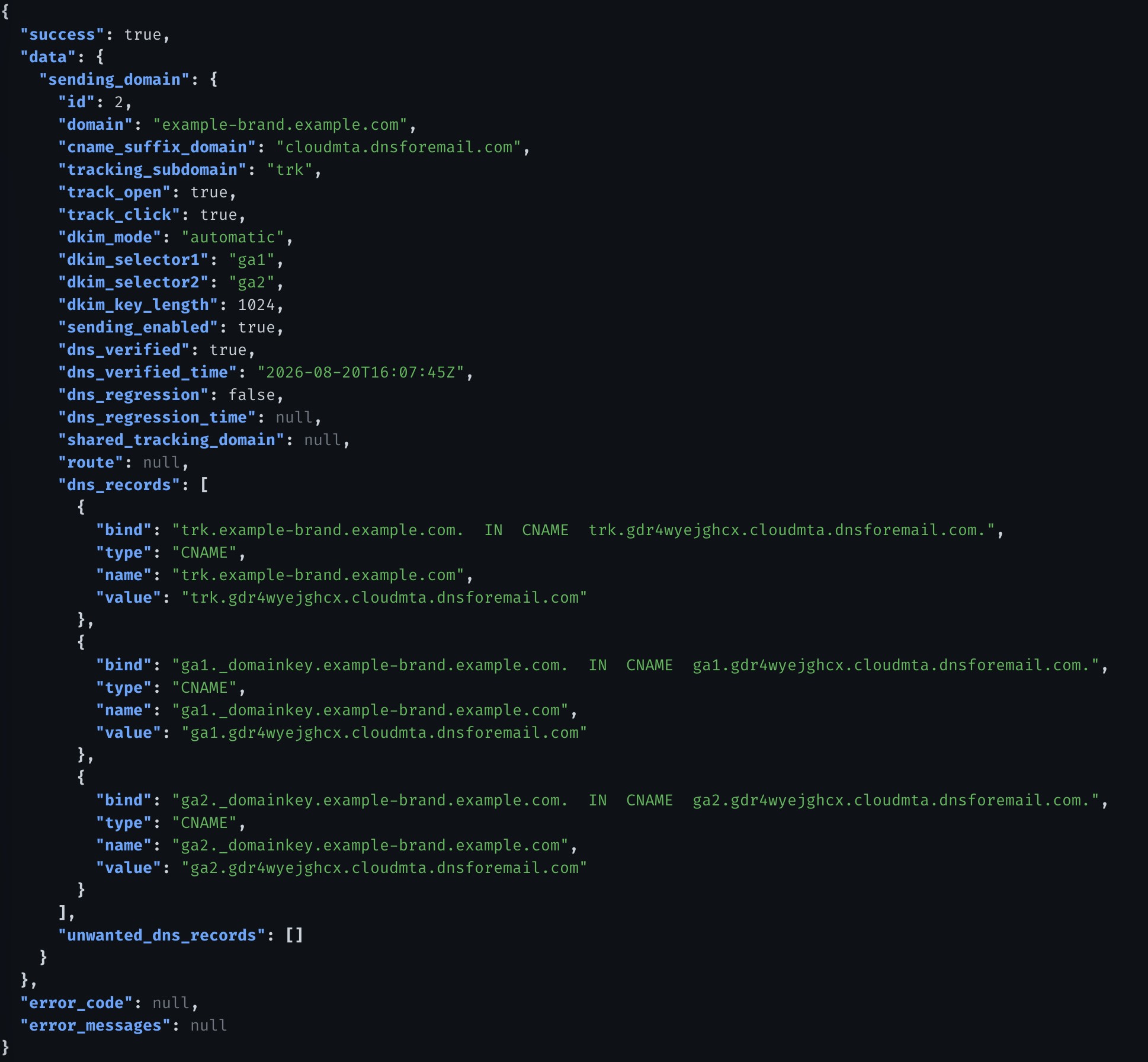
Fetch the domain’s DNS records from the API (GET /ga/api/v3/eng/sending_domains/{id})
or view them in the UI. The records returned in dns_records show exactly what must be
added to your DNS zone.
Each record includes:
-
bind— the full BIND zone file syntax, ready to paste. -
type—CNAMEorTXT. -
name— the DNS hostname. -
value— the expected value. -
verified—trueif the last DNS check accepted the record (including a matching flattened CNAME),falseif it did not, andnullif no DNS check of the domain has completed yet.
The UI also offers a Copy BIND syntax button and a Download zone file
button (named {domain}.conf) for your convenience.
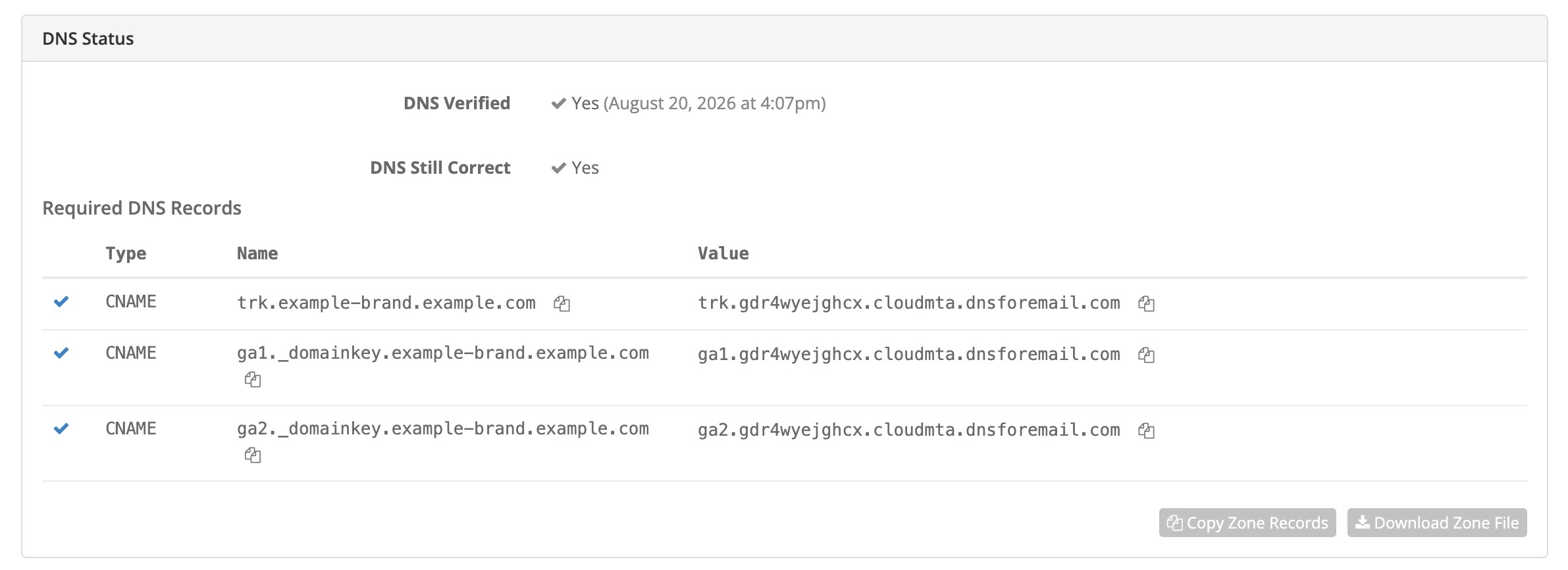
In the user interface, this is how the records you need to create will appear (this is for a domain that has already been configured correctly):
The API, for the same sending domain, looks like this:
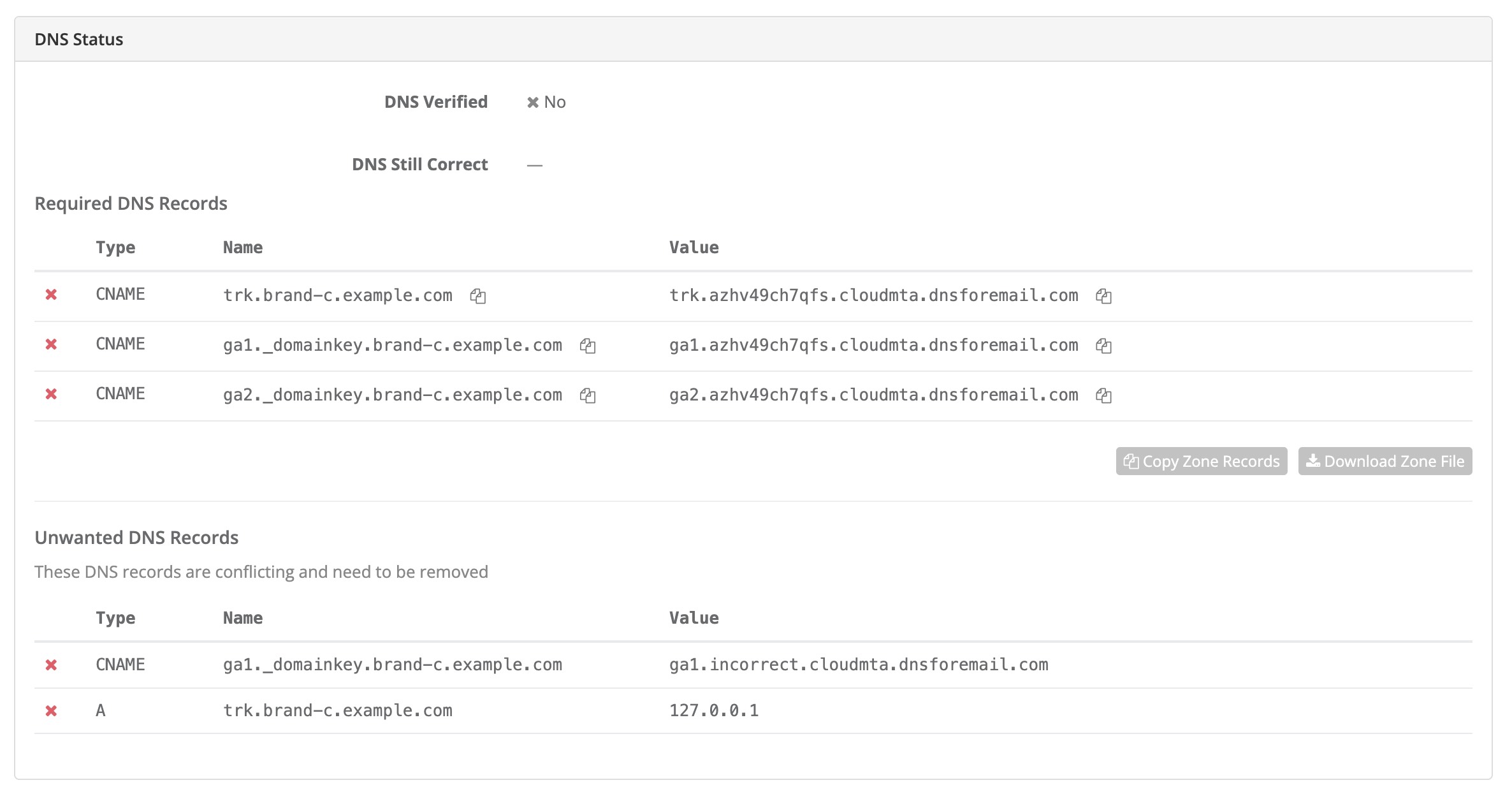
In the user interface, this is how incorrect / missing records will appear (this represents records that you need to update / add / remove):
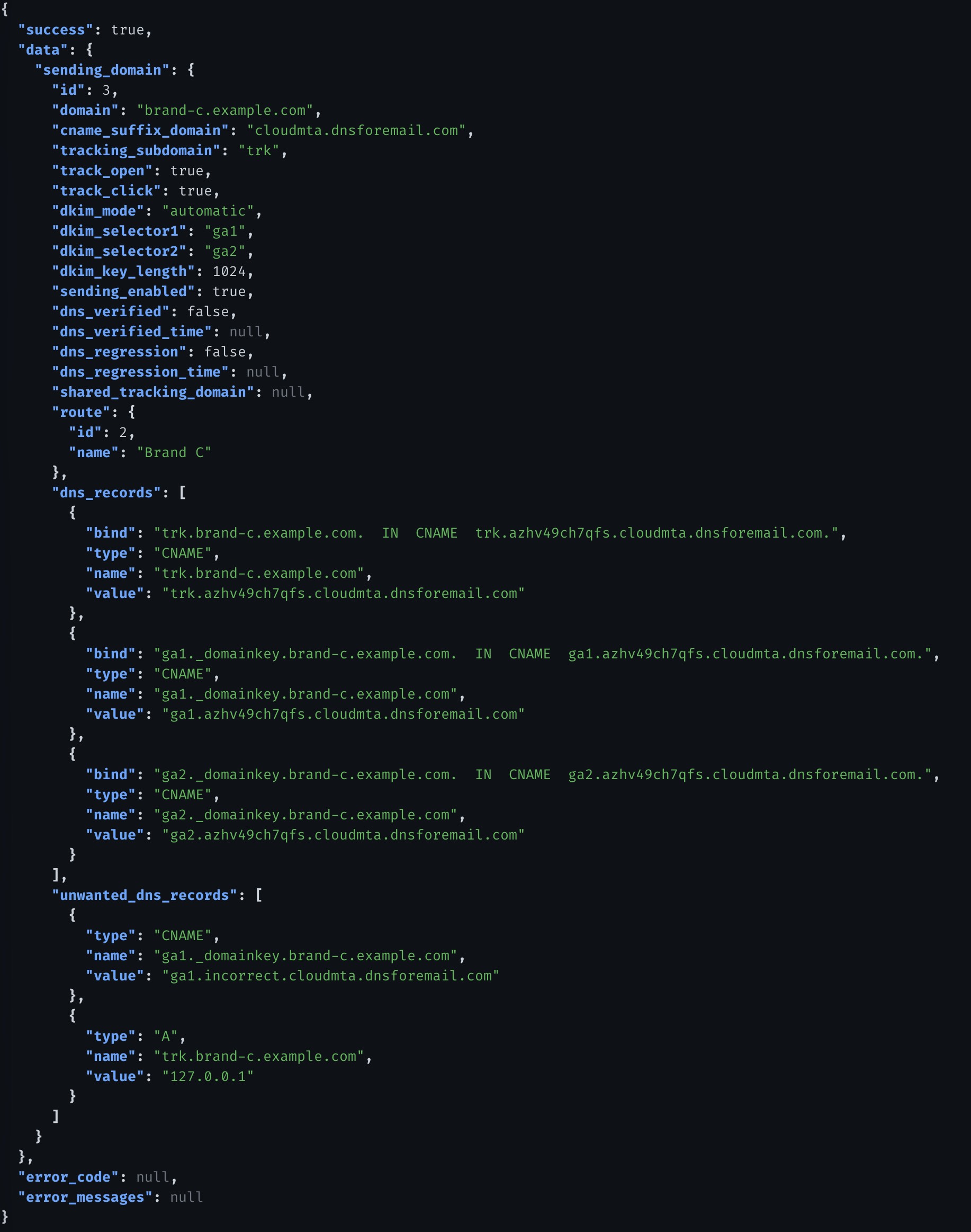
The API, for the same sending domain, looks like this:
3. Add the Records to DNS
Add the provided records to your DNS provider. GreenArrow does not require
delegation of the entire domain — only the specific hostnames listed in
dns_records need to be added.
4. Verify DNS
GreenArrow automatically checks DNS every 15 minutes. You can also trigger an immediate check via the UI (Recheck DNS), or via the API:
GET /ga/api/v3/eng/check_dns/{domain}?recheck_now=1
The API allows one immediate check of a domain in 60 seconds (see the Check DNS API).
DNS lookups are performed against the domain’s authoritative nameservers
directly (not a local caching resolver), and all nameservers are checked in
parallel with a 10-second timeout. The response shows each record’s verified
status and whether CNAME flattening was detected.
Once all wanted records are verified and no unwanted records are present,
dns_verified is set to true. This is a one-way flag — it never returns to false,
even if the DNS settings regress.
5. Automatic Provisioning on Verification
When dns_verified first becomes true, GreenArrow automatically creates or
adopts the following records (these records may not be edited nor deleted):
-
URL Domain —
{tracking_subdomain}.{domain}, used for click and open tracking links. -
Incoming Email Domain —
{tracking_subdomain}.{domain}, used to receive bounces. Mailboxes forreturn,abuse, andpostmasterare created on this domain. - DKIM Keys — the first key generated on creation is marked as the default for the domain, making it active for signing.
6. Start Sending
Once dns_verified is true, the Sending Domain is fully operational. Email
injected with a From header matching this domain will be DKIM-signed, tracked
through the verified tracking domain, and have bounces routed correctly.
With the GreenArrow CloudMTA, you may not send using a RFC5322.From domain until it has been verified as a Sending Domain. Once the DNS has been verified, if the DNS regresses, you are still able to send using the RFC5322.From domain. (If this restriction is a problem, please contact GreenArrow technical support, there are some options where this restriction may be lifted.)
Fields Reference
|
domain
string /immutable |
The RFC5322.From domain for this Sending Domain.
|
||||||||||
|
tracking_ string /immutable /default: |
The subdomain of When a Shared Tracking Domain is assigned, this field is no longer relevant (the tracking DNS moves to the Shared Tracking Domain).
|
||||||||||
|
shared_ hash /optional An
|
|||||||||||
|
track_ boolean /optional /default: |
Whether opens are tracked for this domain. When set, this overrides
the Mail Class setting. The default of |
||||||||||
|
track_ boolean /optional /default: |
Whether clicks are tracked for this domain. When set, this overrides
the Mail Class setting. The default of |
||||||||||
|
route
hash /optional An
|
|||||||||||
|
dkim_ string /immutable /default: |
How DKIM keys are set up.
|
||||||||||
|
dkim_ string /immutable /optional |
The selector name for the first DKIM key. Immutable after creation. If not supplied, it is filled in with the configured default; the resulting value is always stored, so the selectors are never null.
|
||||||||||
|
dkim_ string /immutable /optional |
The selector name for the second DKIM key. Immutable after creation. If not supplied, it is filled in with the configured default; the resulting value is always stored, so the selectors are never null.
|
||||||||||
|
sending_ boolean /default: |
When |
||||||||||
|
dkim_ integer /immutable /default: |
The bit length for generated DKIM keys.
|
||||||||||
|
dns_ boolean /read-only |
|
||||||||||
|
dns_ boolean /read-only |
|
||||||||||
|
dns_ array of hashes /read-only Array of DNS record objects.
|
|||||||||||
cname_flattening_detected is not returned here; see the Check DNS API
for it and for forced rechecks.
DNS Records Created for Sending Domains
Tracking subdomain (when not using a Shared Tracking Domain)
{tracking_subdomain}.{domain}. IN CNAME {tracking_subdomain}.{dns_code}.dnsforemail.com.
DKIM records — automatic mode
{dkim_selector1}._domainkey.{domain}.  IN  CNAME  {dkim_selector1}.{dns_code}.dnsforemail.com.
{dkim_selector2}._domainkey.{domain}.  IN  CNAME  {dkim_selector2}.{dns_code}.dnsforemail.com.
GreenArrow manages the TXT records at the CNAME targets in dnsforemail.com.
This means DKIM key rotation can happen without any DNS changes on your end.
An ESP can replace dnsforemail.com with their own domain name that is NS delegated to
GreenArrow’s nameservers. This helps avoid vendor lock-in. Contact GreenArrow technical
support to set this up.
DKIM records — txt_single mode
{dkim_selector1}._domainkey.{domain}. IN TXT "v=DKIM1; k=rsa; p={public_key}"
DKIM records — txt_multiple mode
{dkim_selector1}._domainkey.{domain}.  IN  TXT  "v=DKIM1; k=rsa; p={public_key_1}"
{dkim_selector2}._domainkey.{domain}.  IN  TXT  "v=DKIM1; k=rsa; p={public_key_2}"
Uniqueness
The tracking domain and DKIM domains for Sending Domains and Receiving Domains
may not have conflicting domain names. This means, for example, if you have a
tracking domain named trk.example.com, you may not create a Receiving Domain
named trk.example.com, and visa versa.
How Sending Domain Settings Interact with Mail Classes
Sending Domain settings override Mail Class settings for email injected with a matching From domain, but can themselves be overridden by per-message headers. The precedence order from lowest to highest is:
- Mail Class — baseline settings configured on the mail class.
-
Sending Domain —
- the tracking domain or the Shared Tracking Domain always override the MailClass’ bounce handling address and click/open tracking URL Domain.
-
track_openandtrack_click, if present, override the MailClass click/open tracking settings. - The
route, if present, overrides the MailClass VirtualMTA setting.
-
Per-message headers — The headers
X-GreenArrow-Route,X-GreenArrow-Mtaid,X-GreenArrow-TrackOpens,X-GreenArrow-TrackClicks, andX-GreenArrow-Click-Tracking-Doalways take highest precedence and override the Sending Domain’s route and click/open tracking settings.
This means:
- If
track_openisfalseon the Sending Domain, opens are not tracked for that domain even if the Mail Class has open tracking enabled. - If a
route_idis set on the Sending Domain, that route is used for all messages from that domain — unless a message carriesX-GreenArrow-Route. - The tracking domain for links and bounces comes from the Sending Domain (or its associated Shared Tracking Domain), not from the Mail Class URL domain.
Shared Tracking Domains
A Shared Tracking Domain allows multiple Sending Domains to share a single
set of tracking infrastructure (click/open tracking links and bounce handling)
rather than each having their own {tracking_subdomain}.{domain}.
When to Use a Shared Tracking Domain
Use a Shared Tracking Domain when:
- You want all your senders’ tracking links and bounce processing email addresses
to share a single branded domain (e.g.
click.yourplatform.comorbounce.yourplatform.com). - You want to reduce the number of DNS records your senders need to configure — the tracking DNS is set up once on the Shared Tracking Domain and shared across all Sending Domains that reference it.
Setup Walkthrough
- Create a Shared Tracking Domain via
POST
/ga/api/v3/eng/shared_tracking_domains
. Specify:-
domain— the base domain (e.g.yourplatform.com). -
url_domain— the hostname for click/open tracking links. Must be a subdomain ofdomain, or equal todomain. Optional; defaults todomain. -
bounce_domain— the hostname for bounce/complaint handling. Must be a subdomain ofdomain, or equal todomain. Optional; defaults todomain.
-
-
Add the DNS records returned in
dns_recordsto the Shared Tracking Domain’s DNS zone. Verify viaGET /ga/api/v3/eng/check_dns/{domain}?recheck_now=1(allowed once in 60 seconds for a domain). -
When DNS is verified, GreenArrow automatically creates a URL Domain and Incoming Email Domain for the Shared Tracking Domain.
- When creating Sending Domains, set the
shared_tracking_domainfield to point to this record. The Sending Domain’stracking_subdomainbecomes optional and the tracking DNS is handled by the Shared Tracking Domain instead.
Fields
|
domain
string /immutable |
The base domain for this shared tracking setup.
|
|
url_ string /immutable /optional |
The hostname used for click/open tracking links. If omitted,
|
|
bounce_ string /immutable /optional |
The hostname used for bounce/complaint email. If omitted,
|
|
dns_ boolean /read-only |
|
|
dns_ boolean /read-only |
|
|
dns_ array of hashes /read-only |
Same structure as Sending Domain |
Deletion Constraint
A Shared Tracking Domain cannot be deleted while any non-deleted Sending Domains reference it. Remove or reassign those Sending Domains first.
DNS Records Created for Shared Tracking Domains
When url_domain is a subdomain of domain:
{subdomain_part}.{domain}. IN CNAME {subdomain_part}.{dns_code}.dnsforemail.com.
When url_domain equals domain (apex):
{domain}. IN CNAME _root.{dns_code}.dnsforemail.com.
The same pattern applies for bounce_domain.